Nanfeng

Notes on software development, code, and curious ideas

Checking Whether an APK Supports 16 KB Page Sizes

Background

Starting November 1, 2025, new apps and updates submitted to Google Play that target Android 15 or later must support 16 KB page sizes on 64-bit devices.

Check whether the app contains native code

  1. Rename the APK from .apk to .zip and extract it.
  2. Look for paths such as:
1
2
lib\arm64-v8a\libcocos.so
lib\arm64-v8a\libswappy.so
  1. If the archive contains no .so files, no native-library alignment work is required.
  2. If it contains .so files, check whether each one supports 16 KB pages.

Check a .so file’s 16 KB alignment

Google requires the ELF segments in native libraries to support 16,384-byte alignment. In practice, the p_align value in each program header must be 0x4000 or a multiple of it.

Method 1: Use readelf

If the Android NDK is installed, run:

1
readelf -l yourlib.so

On Windows, the executable is named readelf.exe. Depending on the installed NDK version, it may be located under a path similar to:

1
..\ndk\21.1.6352462\toolchains\llvm\prebuilt\windows-x86_64\aarch64-linux-android\bin\readelf.exe

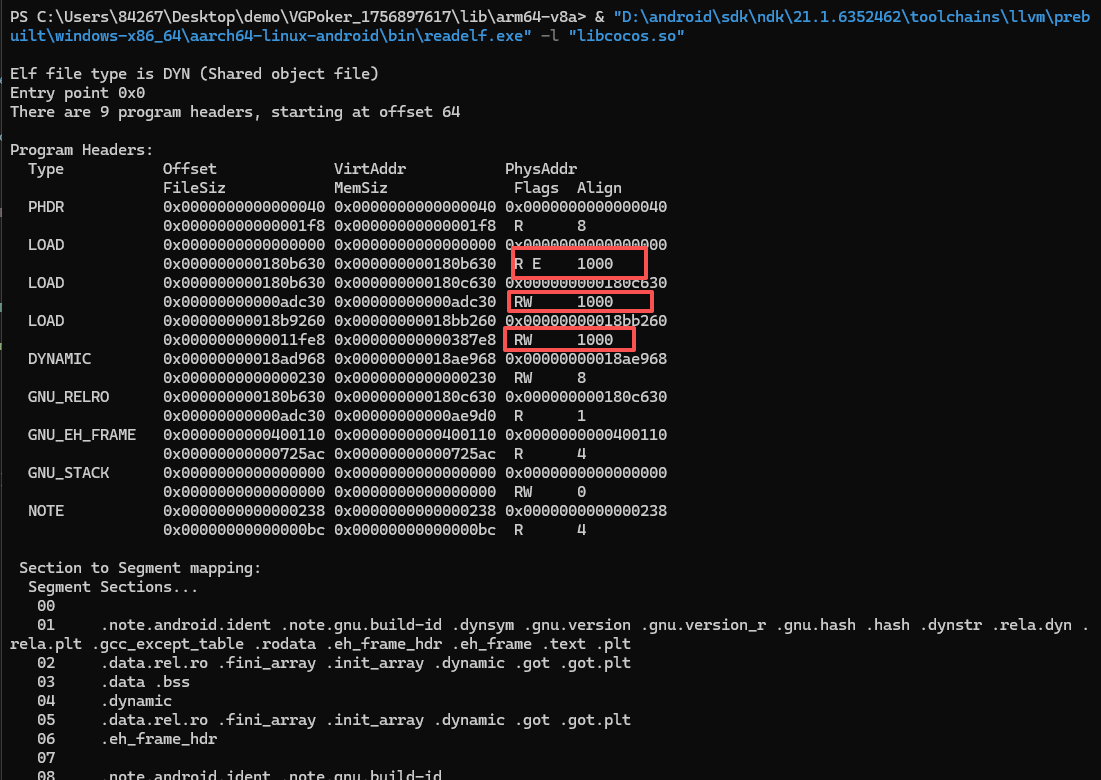
Example output:

readelf output

Inspect the final column for every LOAD segment:

  • 1000 means 4 KB alignment and is not compatible with 16 KB pages.
  • 4000 or greater supports 16 KB pages.

All LOAD segments must use 4000 or greater. In my example, the APK did not support 16 KB pages.

Method 2: Scan every .so file with PowerShell

Save the following script as check_so_align.ps1:

1
2
3
4
5
6
7
8
9
10
11
12
13
14
15
16
17
18
19
20
21
22
23
24
25
26
27
28
29
30
31
32
33
34
35
36
37
38
39
40
41
42
43
44
45
46
47
48
49
50
51
52
53
54
55
56
57
58
59
param(
[string]$ApkPath = "path to APK",
[string]$ReadElfPath = "path to readelf.exe"
)

$tempDir = Join-Path $env:TEMP ("apk_extract_" + [System.Guid]::NewGuid().ToString())
Write-Host "Extracting APK to temporary directory: $tempDir"

Add-Type -AssemblyName System.IO.Compression.FileSystem
try {
[System.IO.Compression.ZipFile]::ExtractToDirectory($ApkPath, $tempDir)
} catch {
Write-Host "Failed to extract APK. Make sure the file exists and is not corrupted." -ForegroundColor Red
exit
}

$soFiles = Get-ChildItem -Path $tempDir -Recurse -Include *.so
if ($soFiles.Count -eq 0) {
Write-Host "No .so files found. Please check if the APK contains native libraries."
Remove-Item -Path $tempDir -Recurse -Force
exit
}

Write-Host "Checking LOAD segments for 16KB alignment..."
$notAligned = @()

foreach ($file in $soFiles) {
$output = & $ReadElfPath -l $file.FullName 2>$null
if ($LASTEXITCODE -ne 0) {
Write-Host "Cannot read $($file.Name), skipping."
continue
}

$fileAligned = $true
foreach ($line in $output) {
if ($line -match "LOAD\s+.*\s+(\S+)$") {
$alignHex = $matches[1]
$alignValue = 0
try { $alignValue = [Convert]::ToInt32($alignHex, 16) } catch {}
if ($alignValue -lt 0x4000) {
$fileAligned = $false
break
}
}
}

if (-not $fileAligned) {
$notAligned += $file
}
}

if ($notAligned.Count -eq 0) {
Write-Host "All .so files meet 16KB LOAD segment alignment!" -ForegroundColor Green
} else {
Write-Host "The following .so files are NOT aligned to 16KB in LOAD segments:" -ForegroundColor Red
foreach ($f in $notAligned) { Write-Host " - $($f.FullName)" }
}

Remove-Item -Path $tempDir -Recurse -Force

Run it from PowerShell:

1
.\check_so_align.ps1

Example result:

PowerShell scan result

+