This is the configuration that allowed an older quick-Cocos2d-x project to run and debug from VS Code on Windows.
1. Install the Lua debugger
The original setup used the luaide-lite extension. Other Lua debuggers use different launch fields, so follow the selected extension’s own documentation.
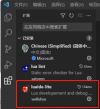
2. Add launch.json
Open Run and Debug and create .vscode/launch.json. Keep the extension’s Cocos-launch configuration and set exePath to the project’s player3 executable, which was the path that worked in this environment.
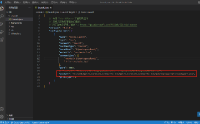
At this stage the player can launch, but Lua breakpoints still require the debug bootstrap.
3. Add LuaDebug.lua
Place the debugger’s LuaDebug.lua file in the project’s src directory.
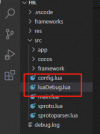
Historical debug helper used by the project
Review third-party debug code before running it and keep its listening socket limited to local development.
4. Initialize it from main.lua
Add:
1 | local breakSocketHandle, debugXpCall = require("LuaDebug")("127.0.0.1", 7003) |
Make sure the port matches the VS Code configuration and remove or disable the remote-debug bootstrap from production builds.

