Nanfeng

Notes on software development, code, and curious ideas

Dynamically Changing Sprite Images in Cocos Creator

I needed to replace the images on seven sprites at runtime, but Cocos Creator reported that the image could not be found:
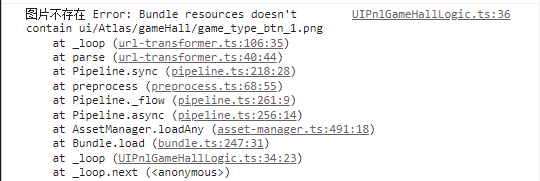
SpriteFrame resource not found

The apparent image path looked correct:

Image path in the Cocos Creator project

The failing version included the source filename extension:

1
2
3
4
5
6
7
8
9
10
for (let i = 0; i < 7; i++) {
const imagePath = `ui/Atlas/gameHall/game_type_btn_${i + 1}.png`;
resources.load(imagePath, SpriteFrame, (err, spriteFrame) => {
if (err) {
console.log('Image not found', err);
return;
}
this.hallImage[i].spriteFrame = spriteFrame;
});
}

To load the imported SpriteFrame sub-asset, omit .png and append /spriteFrame:

1
2
3
4
5
6
7
8
9
10
for (let i = 0; i < 7; i++) {
const imagePath = `ui/Atlas/gameHall/game_type_btn_${i + 1}/spriteFrame`;
resources.load(imagePath, SpriteFrame, (err, spriteFrame) => {
if (err) {
console.log('Image not found', err);
return;
}
this.hallImage[i].getComponent(Sprite).spriteFrame = spriteFrame;
});
}

The resource path refers to the imported asset inside a resources directory, not necessarily the original file path shown by the operating system.


+