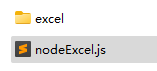
Place the script beside a folder named excel:
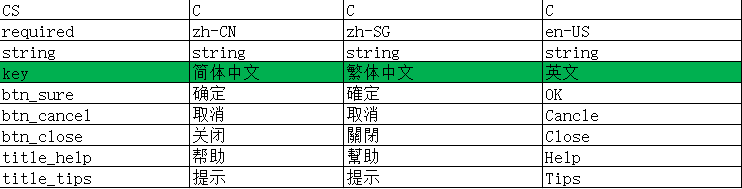
Example spreadsheet:
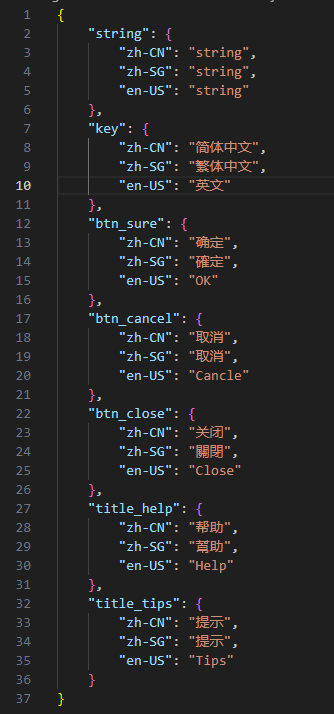
Generated JSON:
Install the dependency first:
Then use this script:
1
2
3
4
5
6
7
8
9
10
11
12
13
14
15
16
17
18
19
20
21
22
23
24
25
26
27
28
29
30
31
32
33
34
35
36
37
38
39
40
const path = require ('path' );const fs = require ('fs' );const xlsx = require ('node-xlsx' );const excelDirectory = path.join (__dirname, 'excel' );fs.readdir (excelDirectory, (readError, files ) => { if (readError) throw readError; for (const filename of files) { if (!/\.xlsx?$/i .test (filename)) continue ; const sourcePath = path.join (excelDirectory, filename); const workbook = xlsx.parse (sourcePath); const rows = workbook[0 ].data ; if (rows.length < 2 ) continue ; const headers = rows[1 ]; const result = {}; for (let rowIndex = 2 ; rowIndex < rows.length ; rowIndex++) { const row = rows[rowIndex]; const key = row[0 ]; if (key === undefined || key === null || key === '' ) continue ; result[key] = {}; for (let column = 1 ; column < headers.length ; column++) { result[key][headers[column]] = row[column]; } } const outputName = `${path.parse(filename).name} .json` ; const outputPath = path.join (excelDirectory, outputName); fs.writeFile (outputPath, JSON .stringify (result), writeError => if (writeError) throw writeError; console .log (`Created ${outputName} ` ); }); } });
This version filters for Excel files, uses the first data column as each object’s key, and uses the header row for property names. Adjust the header and starting-row indexes to match your workbook structure.